


Call Recorder - Cube ACR
4.132.84K Reviews
App Specs
- Version
- 2.4.281
- Updated On
- License
- Free
- Downloads
- 50,000,000+
- Developer
- Cube Apps Ltd
- Categories
- Tools
- Platform
- Android, iOS
Screenshots

 Analysis by AppCompare
I think the most useful way to judge a call-recording app is not just by asking whether it can capture a conversation, but by asking whether you can use it deliberately and handle the resulting audio responsibly. Calls can contain addresses, work details, family matters, or other information people did not expect to become a file. That makes trust and everyday habits part of the decision, not an afterthought.
Recording is a choice with consequences
Call Recorder - Cube ACR is a tools app from Cube Apps Ltd, built around recording phone calls and voice memos. It is free to install, with optional in-app purchases, and its Everyone age classification does not change the privacy responsibilities that come with recording another person. I would treat it as a practical utility, not as a reason to record every conversation automatically.
Before relying on a recording, I would check the rules that apply where I live and consider whether the other person should be told. The safest routine is to record only when there is a clear purpose, such as keeping accurate details from a service call or reviewing instructions, and to avoid capturing sensitive discussions casually. Recording laws and expectations vary, so the app cannot make that judgment for you.
Make the controls serve your routine
Automatic recording can save you from forgetting to start capture, but it also makes selectivity important. If you use the option to choose contacts for automatic recording, I would keep that list narrow and review it whenever your needs change. A contact-based setup is more intentional than treating every incoming and outgoing call alike, especially on a phone shared for both work and personal life.
Bookmarks can also make the app more useful without changing how you listen. When someone gives a long set of directions, I would mark the moment a key address or appointment detail comes up, then return to that point instead of replaying the whole call. The trade-off is that a bookmark is only helpful if you remember to place it while the conversation is happening; it does not replace a written note for information you need to act on immediately.
Think about the recording after the call
Cloud backup and PIN protection are meaningful options to consider, but they solve different problems. A PIN can add a barrier to someone casually opening recordings on your device; backup can make files more convenient to retrieve if you use it. Neither option is a substitute for deciding which conversations deserve to be kept, and I would periodically remove recordings I no longer need rather than letting an archive grow without a purpose.
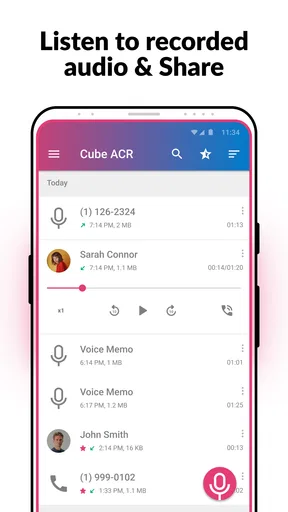
I also would not assume that a recording is usable simply because the app saved a file. A quick playback check after an important call is a sensible habit: it tells you whether both sides can be heard clearly enough for your purpose. If a recording matters for a deadline, a dispute, or a detailed instruction, I would write down the essential points as a second record rather than relying on audio alone.
Worth Reading Before You Choose

EA SPORTS FC Mobile 26 Is a Bigger Football Game, but It Takes Time

Flipboard Shows What News Apps Must Do Beyond the Feed

Switching to Android Auto Means Rethinking Your Driving Routine

Google Calendar Makes a Crowded Week Easier to Manage

Ludo King Makes the Most of the Minutes Between Plans

Baby Panda World Brings Quick Play to Modern Phones, but Its Game Library Feels Busy
Compatibility matters more than a feature list
Call recording can behave differently depending on a phone, operating system, and calling method. Cube ACR may be a convenient option on a device where its recording workflow works well, but I would test it with a low-stakes call before depending on it for something important. A short test helps reveal whether the audio is clear and whether the setup behaves as expected on your particular device.
This is also where it differs from the simplest alternatives. A phone’s built-in recording option, when available, can mean less setup and fewer moving parts. A manual voice recorder is often better for an in-person meeting or a note to yourself, but it is not the same as capturing a phone conversation. Cube ACR is most compelling when you want call-focused organization and automation; it is less appealing if your phone already handles the job reliably or you only record occasionally.
Who will get the most from it
I can see this helping someone who regularly needs to revisit verbal details: a person coordinating appointments, a freelancer keeping track of client instructions, or a family member helping manage practical arrangements. In those situations, the ability to find a saved call and jump to a marked moment may be more useful than simply having a large collection of recordings.
For example, imagine arranging a repair by phone while you are away from your desk. The other person gives a time window, a part name, and a follow-up instruction. If recording is lawful and everyone’s expectations are handled appropriately, an automatic recording can preserve those details; a bookmark at the instruction makes later review quicker. I would still put the appointment time in a calendar, because a recording is a reference, not a reminder system.
On the other hand, I would skip this kind of app if you rarely need call recordings, are uncomfortable maintaining audio files, or want a solution that works identically on every phone and calling service. Someone who mainly needs meeting notes may be better served by a purpose-built note-taking workflow, while anyone with a compatible built-in call-recording feature may prefer that simpler route.
What is Cube ACR?
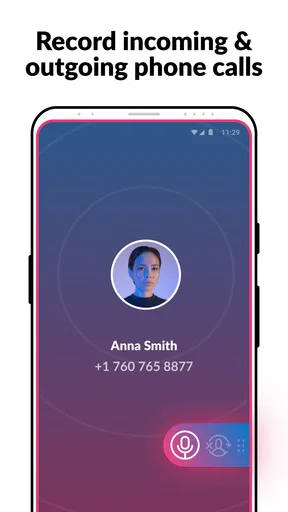
First off, Cube ACR is a call recording app available on both Android and iOS. It's designed to record phone calls and VoIP conversations efficiently. Whether you're using WhatsApp, Skype, Viber, or pretty much any other major service, Cube ACR has got you covered. It's like having a personal assistant that remembers every single word of your calls!
Setting Up Cube ACR
The setup process is straightforward, which is a relief because nobody wants to spend hours figuring out an app. Once you download it from the Play Store or App Store, it's just a matter of granting the necessary permissions. The app will guide you through a few simple steps to ensure it's working smoothly with your device. Trust me, even if you're not tech-savvy, you can get this up and running in no time.
User Interface and Experience
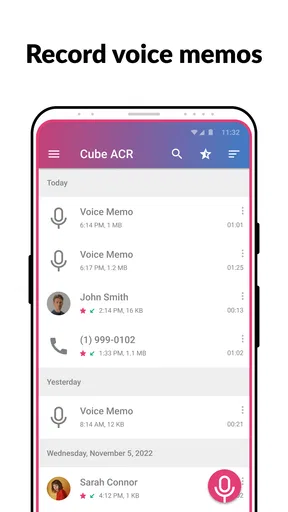
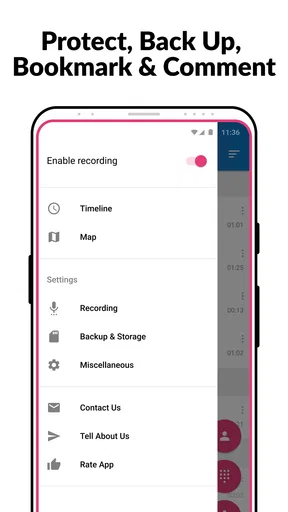
Let's talk about the app's interface. It's clean and intuitive, which I love. The main screen gives you easy access to your recordings, and organizing them is a piece of cake. You can sort your calls by date, contact, or duration. Plus, the search function is super handy if you're trying to track down a specific conversation. It's all about making life easier, and Cube ACR nails it.
Features That Stand Out
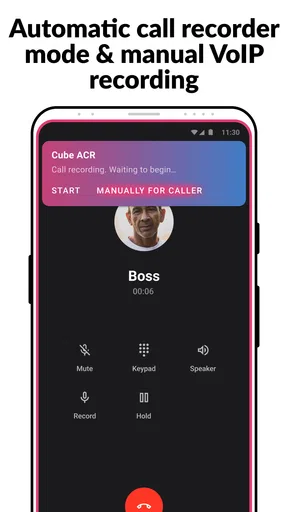
Okay, so what makes Cube ACR a standout option? First, it records in high quality, which is crucial if you need clear audio for personal or professional reasons. It also supports automatic call recording, so you don't have to remember to hit 'record' every time you start a conversation.
One feature that I find particularly cool is the ability to mark important parts of a conversation while it's happening. Just tap a button, and it creates a bookmark. This is super useful for those moments when you're like, "Oh, I need to remember this!"
Advanced Settings
For those who like to tinker with settings, Cube ACR offers advanced options. You can choose which contacts get recorded automatically, set up cloud backup, and even protect your recordings with a PIN. It's all about giving you control over your data.
Performance and Reliability
When it comes to performance, Cube ACR is generally reliable. I tested it with various apps and found it worked seamlessly across the board. There might be some compatibility hiccups depending on your device model, but for the most part, it performs without a hitch. And if you do run into issues, the app's support team is responsive and helpful.
Is Cube ACR for You?
So, is Cube ACR the right call recording app for you? If you often find yourself needing to record calls for business or personal reasons, it's definitely worth considering. With its intuitive design, quality recordings, and robust feature set, it stands out in a crowded market.
That said, always remember to consider the legal implications of recording calls in your area. Make sure you're compliant with local laws to avoid any unwanted surprises.
In conclusion, Cube ACR is a powerful tool for anyone needing reliable call recording capabilities. It's user-friendly, packed with features, and performs well across different platforms. Give it a try and see if it fits your needs!
A practical trial before you depend on it
I would set aside a few minutes after installation to check the whole workflow, not just the first recording. Try a routine call, find the resulting file, play it back, and see whether the contact and date make it easy to identify later. Then test a bookmark during another low-stakes conversation. This small rehearsal answers the most important practical question: does the app fit the way you actually make and revisit calls?
If the sound is incomplete or a calling method does not behave as expected, do not assume that changing a setting will solve every case. Compatibility can depend on the device and the service involved. In that situation, try the app with the specific kind of call you need to record, and keep another method for essential details until you know the results are dependable.
Keep access and storage intentional
Because recordings can be more revealing than ordinary notes, I would make a simple retention rule before building an archive. Keep a file only as long as it serves a real purpose, and use the PIN option if you want an extra step before someone opens recordings on the phone. If you enable cloud backup, think about whether the convenience of having copies available is worth the extra place where those files may be stored. The important point is to make that choice consciously rather than turning on every option by default.
It is also worth separating recordings you need to revisit from those you only made as a temporary aid. A marked segment can help you find a detail, but a concise written summary may be easier to search and share appropriately. For work calls, I would avoid passing an audio file around when a short, accurate note is enough; audio preserves more context than many follow-up tasks require.
Cost, support, and platform expectations
The app is free to start, while optional purchases range from $1.99 to $25.99 per item. I would first decide whether the basic recording workflow solves your problem before paying for anything. A purchase is easier to judge after you have checked compatibility, tried locating files, and decided which added convenience you actually need. That approach prevents paying for an option that does not address the main obstacle on your phone.
On Android, the current version is 2.4.281 and the minimum operating-system requirement is Android 6.0. The product has been available since December 13, 2016, and its scale suggests that many people have looked at it: it has more than 10 million installs, around 890,000 ratings, and roughly 32,000 written reviews, with a 4.0 average. Those figures are useful context, but they cannot tell you whether recording will work consistently on your particular device or calling setup. I would give a small test more weight than popularity when deciding whether to trust it for an important conversation.
For iPhone users, I would be especially careful to verify the exact recording behavior available on their device before planning a workflow around it. A shared app name does not guarantee identical capabilities across operating systems, and the right choice is the one that works for the calls you actually make. If straightforward capture matters more than contact-based automation or bookmarks, a built-in option may be the cleaner fit where one is available.
A measured recommendation
My overall view is that Cube ACR is worth considering when call recording is a recurring need and you are willing to check how it behaves on your phone. Its appeal is the combination of automatic capture, contact selection, searchable organization, bookmarks, and options for protecting or backing up recordings. Those tools can turn a pile of audio into a usable reference, provided you create sensible habits around them.
I would not treat it as an invisible recorder or a guaranteed archive. Ask whether recording is appropriate, keep the selected contacts limited, test playback, and retain only what you need. If you want dependable notes without managing sensitive audio, a calendar entry or written summary is often the better answer. If you regularly need to revisit call details and the app works well in your own tests, it can earn a place in your toolkit.
Pros
- High-quality audio recordings
- Supports various call apps
- Easy-to-use interface
- Automatic call recording feature
- Secure storage options
Cons
- Limited free version features
- Incompatible with some devices
- Requires permissions access
- Occasional recording glitches
- Ads in the free version
FAQs for Call Recorder - Cube ACR
How does Call Recorder - Cube ACR work on Android devices?
Call Recorder - Cube ACR is an Android app designed to automatically record phone calls and VoIP conversations. Once installed, it integrates seamlessly with your phone, recognizing both incoming and outgoing calls. Users can manage recordings through its intuitive interface, save important calls, and even configure specific contacts for automatic recording.
Is Call Recorder - Cube ACR compatible with all Android phones?
While Call Recorder - Cube ACR is compatible with most Android devices, some phones may have limitations due to manufacturer restrictions or Android version compatibility. It's important to check the app's compatibility with your specific device and ensure that your Android version supports call recording functionalities.
Does Call Recorder - Cube ACR support recording from VoIP apps?
Yes, Call Recorder - Cube ACR supports recording from a range of VoIP apps, including WhatsApp, Skype, Viber, and others. However, the effectiveness can vary based on the app version and phone specifications. Users may need to adjust settings or grant permissions for optimal performance on VoIP calls.
Is it legal to use Call Recorder - Cube ACR to record calls?
The legality of recording calls varies by country and region. Some places require the consent of all parties involved, while others allow one-party consent. It's crucial to understand the laws in your area before using the app to ensure compliance with local regulations on call recording.
What features are available in the premium version of Call Recorder - Cube ACR?
The premium version of Call Recorder - Cube ACR offers advanced features such as cloud backup, PIN lock for added security, smart storage management, and the ability to record VoIP calls without limitations. These enhancements provide a more robust and secure experience for users who need comprehensive call recording options.


